REST API User Guide

USS 2.0 tracking system by Poczta Polska SA

1. Introduction

Poczta Polska SA provides a REST API web service that can be used to create applications that enable tracking of postal items.

the service is available at:

The tracking system service allows you to create one-off shipments with a single shipment number or multiple shipments, in accordance with your permissions.
For a one-time system query, you can use the default account with the following parameters:
  • login: sledeniepp
  • password: PPSA (for SOAP/WSDL as passwordText)
  • password hash: 5EF1C8ABD8BA2186F781B715CAFFF3C8D08567D78F7C5B6138F4013652E3DBB9 (for USS)
We encourage customers who plan to submit one-time inquiries about larger shipments or obtain extended shipment information to create a dedicated account. To do so, please contact Poczta Polska SA using the dedicated form.

2. Web service methods

I Information Methods
version
returns the current version number of the website, local time in Poland and a list of supported languages
checkmailcount
returns the maximum number of shipments (1 – 999) that the user can query using the checkmailcollectionex
II Account management
login
User authentication. Requires a username and password in the form of a SHA256 sum of the password hash (for users already with individual tracking system accounts in WSDL, this is SHA1, for clients of new tracking system services, SHA256).
That is:
  • For existing users whose account was created before July 10, 2024, the password looks like this: sha256(sha1('Your password').upperCase()).upperCase()
  • for new accounts created after July 10, 2024 or changing their password using the changepassword the password looks like this: sha256(sha256('Your password').upperCase()).upperCase()
As a result, the method returns an authorization token that should be placed in the http header in the API_KEY element of each authorized method.
changepassword
Changing the password for a tracking system user requires entering a new password and the PIN obtained during tracking system account registration (in individual cases, a PIN is not required). This method returns the SHA256 sum of the SHA256 sum of the provided password, as well as a temporary authorization token (after a successful password change, re-authentication using the login method is required) .
III. Checking shipment data
checkmailex
Basic data validation for a single shipment. Requires the shipment's tracking number. Returns shipment information in the mailInfo structure. Allows for obtaining extended information about post offices, provided special authorization is granted.
checkmailcollectionex
Checking data for multiple shipments. Requires a list of shipment tracking numbers (min. 1, maximum based on granted permissions). Allows you to optionally specify a date range (from – to) that can narrow the search interval for shipment events. Returns shipment information in the form of a list of mailItems . Enables obtaining extended information about post offices.
confirmationofreceipt
Downloading an electronic receipt. Requires additional provisions in the PPSA contract, additional authorizations, and the shipment tracking number. Returns a data stream containing electronic receipts in XML format compressed using the GZIP algorithm.
checkmailcomponents
Returns simplified information about shipment events associated with a waybill. Requires a waybill number. Returns information in a MailComponent structure.
checkmailsubscription
Returns data on shipments sent by or directed to a user with an active subscription to the Poczta Polska SA PUSH service in their mobile app. Requires additional provisions in the agreement with Poczta Polska SA, an active subscription to their app, and integration with subscription methods.
All methods allow you to optionally specify a supported language for which name translation will be performed. By default, the tracking system services return information in Polish.
Using the checkmailcollectionex , changepassword , checkmailcomponents , and checkmailsubscription requires dedicated permissions, and not every user with a tracking system account has access to them by default. These methods require an api_key .
IV Diagnostic Methods
hello
Checks the service response – used to diagnose the application server's response to a query directed to the service without accessing system data. Requires a name/first name. The result is a response in the format "Hello Welcome
" may differ for responses sent in languages ​​other than Polish.
V Description of the statuses of the shipment data search result (mailStatus)
0
The searched shipment details were found
1
Multiple shipments with the specified tracking number were found. The response includes details of the most recently shipped shipment. This status may also indicate a new label has been assigned to the shipment if the previous label has been damaged/destroyed.
-1
The parcel with the indicated tracking number was not found
-2
No tracking number was provided
VI Service Authorization
The tracking system services use the API KEY Security authorization mechanism, which requires that the authorization token be placed in the HTTP header in an element named api_key .

NOTE! For anonymous execution of the hello and version , do not include the api_key (even an empty one) in the header.

3. Working with endpoints

Generating the correct encrypted password
After receiving the email with the password for your account, you must encode it appropriately:
  1. SHA256() cryptographic method
  2. convert the result to uppercase letters UPPERCASE
  3. again using the SHA256() to encode the result from the second iteration
  4. convert the result to uppercase letters again UPPERCASE

Example:

$password = strtoupper( hash("sha256", strtoupper( hash("sha256", "p@ssword") )) );

Try hashing your password:

Once you have your encrypted password, log in to USS (using the login ) to obtain a temporary token , which you can use to change the password—which you received via email when you created your account or reset your password—to your own. After changing your password using the changepassword , you'll receive a production token that you can immediately use to retrieve shipment data.

//we use the $.ajax method const config = { "prod" : { "url" : "https://uss.poczta-polska.pl", "version" : "2.0" "token" : "gNDMstgP3Yr81...0jA42DTc4MrHQ=.ODU1OT...4NjQ5MjE1RQ==.ad5bf522c...197a3944" }, "params" : { "login" : "TestTest", "language": "EN", "password" : "11C39BE1821EFA02383550CAB1D57E243066959B0CDAAF1F052373651AE67DCA" //example password "p@ssw0rd" encoded in sha265 } } jQuery.ajax({ url: config['prod'].url+"/uss/v"+config['prod'].version+"/tracking/login", data: config['params'], type: "POST", contentType: "application/json", success: callback, error: callback });
$curl = curl_init(); $login = "Your login"; $password = strtoupper( hash("sha256", strtoupper( hash("sha256", "Your password") )) ); curl_setopt_array($curl, array( CURLOPT_URL => 'https://uss.poczta-polska.pl/uss/v2.0/tracking/login', CURLOPT_RETURNTRANSFER => true, CURLOPT_ENCODING => '', CURLOPT_MAXREDIRS => 10, CURLOPT_TIMEOUT => 0, CURLOPT_FOLLOWLOCATION => true, CURLOPT_HTTP_VERSION => CURL_HTTP_VERSION_1_1, CURLOPT_CUSTOMREQUEST => 'POST', CURLOPT_POSTFIELDS =>'{ "login": "'.$login.'", "password": "'.$password.'", "language": "PL" }', CURLOPT_HTTPHEADER => array( 'Content-Type: application/json', 'Accept: text/plain' ), )); $response = curl_exec($curl); curl_close($curl); echo $response;

If all data is entered correctly – including a correctly encrypted password – we will receive a status 200 along with a temporary token necessary to change the password. The response will be as follows:

{ "newToken": "gNDMstgP3Yr81...0jA42DTc4MrHQ=.ODU1OT...4NjQ5MjE1RQ==.ad5bf522c...197a3944" }

Generating a new password to obtain the correct token

To do this, use the changepassword to change the first password to your own.

Example:

//we use the $.ajax method const config = { "prod" : { "url" : "https://uss.poczta-polska.pl", "version" : "2.0" "token" : "gNDMstgP3Yr81...0jA42DTc4MrHQ=.ODU1OT...4NjQ5MjE1RQ==.ad5bf522c...197a3944" } } jQuery.ajax({ url: config['prod'].url+"/uss/v"+config['prod'].version+"/tracking/changepassword", beforeSend: function(xhrObj){ xhrObj.setRequestHeader("api_key",config['prod'].token); }, data: { "pin" : "0000", //applies to accounts with active PIN code, if you don't have PIN, remove this variable "password": "new alphanumeric password" }, type: "POST", contentType: "application/json", success: callback, error: callback })
$curl = curl_init(); $password = "your own password"; $pin = "1234"; //optional $apiKey = "gNDMstgP3Yr81...0jA42DTc4MrHQ=.ODU1OT...4NjQ5MjE1RQ==.ad5bf522c...197a3944"; curl_setopt_array($curl, array( CURLOPT_URL => 'https://uss.poczta-polska.pl/uss/v2.0/tracking/changepassword', CURLOPT_RETURNTRANSFER => true, CURLOPT_ENCODING => '', CURLOPT_MAXREDIRS => 10, CURLOPT_TIMEOUT => 0, CURLOPT_FOLLOWLOCATION => true, CURLOPT_HTTP_VERSION => CURL_HTTP_VERSION_1_1, CURLOPT_CUSTOMREQUEST => 'POST', CURLOPT_POSTFIELDS =>'{ "pin" : '.$pin.', "password" : "'.$password.'" }', CURLOPT_HTTPHEADER => array( 'Content-Type: application/json', 'Accept: application/json', 'api_key: '.$apikey, ), )); $response = curl_exec($curl); curl_close($curl); echo $response;

If all data is entered correctly (PIN is optional, its activation requires contacting PPSA), we will receive status 200 along with a production token and our own encrypted password (you do not need to re-encode it). The response will be as follows:

{ "password" : "9489750A8F6F2CF3F9AD1773AD527D0AE8646C6B53399B89B1B6984397F76E6F" "newToken": "HasuKq!w=P3Yr81...0jA42DTc4MrHQ=.ODU1OT...4NjQ5MjE1RQ==.ad5bf522c...197a3944" }

The newToken generated in this way can now be used for other methods available in the API

There are two methods for retrieving shipment data: checkmailex and checkmailcollectionex . The former returns only a single shipment, while the latter retrieves data for multiple shipments simultaneously. The former returns information about a single shipment, while the latter allows for retrieving data for multiple shipments simultaneously. The checkmailcollectionex can work automatically. When the checkmailex "components" collection . Based on this, data can be retrieved automatically using the checkmailcollectionex .

NOTE! Currently, for the checkmailex USS still returns events and states for collective shipments. In the next version of USS, these sets will not be returned when queried for collective shipments. This should be taken into account when designing and implementing your IT systems. Data about shipments within multi-packages or pallets will be returned in the checkmailcollectionex .

Calling the checkmailex

Example:

//we use the $.ajax method const config = { "prod" : { "url" : "https://uss.poczta-polska.pl", "version" : "2.0" "token" : "gNDMstgP3Yr81...0jA42DTc4MrHQ=.ODU1OT...4NjQ5MjE1RQ==.ad5bf522c...197a3944" } } jQuery.ajax({ url: config['prod'].url+"/uss/v"+config['prod'].version+"/tracking/ckeckmailex", beforeSend: function(xhrObj){ xhrObj.setRequestHeader("api_key",config['prod'].token }, data: { "states": true, "number": parcel.val(), //we insert a variable with the shipment number here "language": "PL" }, type: "GET", contentType: "application/json", success: callback, error: callback })
$curl = curl_init(); $apiKey = "gNDMstgP3Yr81...0jA42DTc4MrHQ=.ODU1OT...4NjQ5MjE1RQ==.ad5bf522c...197a3944"; $number = 123456; //add your parcel number $params = array( 'language' => 'PL', 'number' => $number, 'addPostOfficeInfo' => true, //only if the USS user has the additional attribute 'states' => true ); curl_setopt_array($curl, array( CURLOPT_URL => 'https://uss.poczta-polska.pl/uss/v2.0/tracking/checkmailex?'.http_build_query($params), CURLOPT_RETURNTRANSFER => true, CURLOPT_ENCODING => '', CURLOPT_MAXREDIRS => 10, CURLOPT_TIMEOUT => 0, CURLOPT_FOLLOWLOCATION => true, CURLOPT_HTTP_VERSION => CURL_HTTP_VERSION_1_1, CURLOPT_CUSTOMREQUEST => 'GET', CURLOPT_HTTPHEADER => array( 'Accept: application/json', 'api_key: '.$apiKey ), )); $response = curl_exec($curl); curl_close($curl); echo $response;

USS response for checkmailex

{ "mailInfo": { "number": "123456789", "typeOfMailCode": "PX2", "typeOfMailName": "Pocztex", "states": [ { "code": "PRZ", "name": "PRZYGOTOWANA", "time": "2024-06-06T11:59:01" } ], "finished": false, "events": [ { "code": "P_REJ_KN1", "name": "Electronic shipment data received", "time": "2024-06-06T11:59:01", "postOffice": { "name": "Electronic Sender" }, "finished": false, "canceled": false, "state": { "code": "PRZ", "name": "READY" } } ] }, "number": "123456789", "mailStatus": 1 }

To call the method we use an active token .

Calling the checkmailcollectionex

Example:

//we use the $.ajax method const config = { "prod" : { "url" : "https://uss.poczta-polska.pl", "version" : "2.0" "token" : "gNDMstgP3Yr81...0jA42DTc4MrHQ=.ODU1OT...4NjQ5MjE1RQ==.ad5bf522c...197a3944" } } const parcels = ["123456789","PX6761595367","PX1234102917"]; jQuery.ajax({ url: config['prod'].url+"/uss/v"+config['prod'].version+"/tracking/ckeckmailcollectionex", beforeSend: function(xhrObj){ xhrObj.setRequestHeader("api_key",config['prod'].token); }, data: { "states": true, "addPostOfficeInfo": false, "number": parcels, //insert parcel tables with shipment numbers here "language": "PL" }, type: "POST", contentType: "application/json", success: callback, error: callback })
$curl = curl_init(); $apiKey = "gNDMstgP3Yr81...0jA42DTc4MrHQ=.ODU1OT...4NjQ5MjE1RQ==.ad5bf522c...197a3944"; $numbers = ["123456789","PX6761595367","PX1234102917"]; //add your parcels array $params = array( 'language' => 'PL', 'number' => $numbers, 'addPostOfficeInfo' => false, 'states' => true ); curl_setopt_array($curl, array( CURLOPT_URL => 'https://uss.poczta-polska.pl/uss/v2.0/tracking/checkmailcollectionex?'.http_build_query($params), CURLOPT_RETURNTRANSFER => true, CURLOPT_ENCODING => '', CURLOPT_MAXREDIRS => 10, CURLOPT_TIMEOUT => 0, CURLOPT_FOLLOWLOCATION => true, CURLOPT_HTTP_VERSION => CURL_HTTP_VERSION_1_1, CURLOPT_CUSTOMREQUEST => 'POST', CURLOPT_HTTPHEADER => array( 'Accept: application/json', 'api_key: '.$apikey ), )); $response = curl_exec($curl); curl_close($curl); echo $response;

USS response for checkmailcollectionex

The above method is used to query the tracking system for multiple shipments in two cases:

  • when we know the set of shipments to be queried (shipment table)
  • when in the checkmailex we receive a key with an array of components , then we should use this method to retrieve data about shipments in this collection.
{ "status": 0, "mailItems": [ { "mailInfo": { "number": "123456789", "typeOfMailCode": "PX2", "typeOfMailName": "Pocztex", "states": [ { "code": "PRZ", "name": "PRZYGOTOWANA", "time": "2024-06-06T11:59:01" } ], "finished": false, "events": [ { "code": "P_REJ_KN1", "name": "Electronic shipment data received", "time": "2024-06-06T11:59:01", "postOffice": { "name": "Electronic Sender" }, "finished": false, "canceled": false, "state": { "code": "PRZ", "name": "PRZYGROTOWANA" } } ] }, "number": "123456789", "mailStatus": 1 }, { "mailInfo": { "number": "PX6761595367", "typeOfMailCode": "PX2", "typeOfMailName": "Pocztex", "states": [ { "code": "PRZ", "name": "PRZYGROTOWANA", "time": "2024-06-19T11:09:06" }, { "code": "NA", "name": "NADANA", "time": "2024-06-24T17:27:58" }, { "code": "TR", "name": "W TRANSPORCIE", "time": "2024-06-26T10:29:44" }, { "code": "DOR", "name": "W DORĘCZENIU", "time": "2024-06-26T10:55:17" }, { "code": "DO", "name": "DORĘCZONA", "time": "2024-06-26T16:07:42" } ], "finished": true, "events": [ { "code": "P_REJ_KN1", "name": "Electronic shipment data received", "time": "2024-06-19T11:09:06", "postOffice": { "name": "Electronic Sender" }, "finished": false, "canceled": false, "state": { "code": "PRZ", "name": "PRZYGOTOWANA" } }, { "code": "P_NAD", "name": "Sending the shipment", "time": "2024-06-24T17:27:58", "postOffice": { "code": "258468", "name": "UP Pabianice 1", "officeType": "UP" }, "finished": false, "canceled": false, "state": { "code": "NA", "name": "NADANA" } }, { "code": "P_WEMAIL", "name": "E-mail notification sent", "time": "2024-06-24T17:45:35", "postOffice": { "name": "Centralna Baza Danych ZST" }, "finished": false, "canceled": false }, { "code": "P_WZL", "name": "Wysłanie pocztowanie", "time": "2024-06-25T06:05:32", "postOffice": { "code": "258468", "name": "UP Pabianice 1", "officeType": "UP" }, "finished": false, "canceled": false, "state": { "code": "TR", "name": "W TRANSPORCIE" } }, { "code": "P_PZL", "name": "Nadejście", "time": "2024-06-25T09:28:49", "postOffice": { "name": "Terminal Przełaunkowy", "officeType": "CP WER" }, "finished": false, "canceled": false }, { "code": "P_WZL", "name": "Sending the shipment", "time": "2024-06-25T21:58:31", "postOffice": { "name": "Terminal Przeładunkowy", "officeType": "CP WER" }, "finished": false, "canceled": false, "state": { "code": "TR", "name": "W TRANSPORCIE" } }, { "code": "P_PZL", "name": "Nadejście", "time": "2024-06-26T02:12:20", "postOffice": { "name": "Terminal Przeładunkowy", "officeType": "CP WER" }, "finished": false, "canceled": false }, { "code": "P_Z", "name": "wyjazd z Urzęd", "time": "2024-06-26T09:00:42", "postOffice": { "code": "433373", "name": "WER Wrocław", "officeType": "CP WER" }, "finished": false, "canceled": false }, { "code": "P_WZL", "name": "Sending the shipment", "time": "2024-06-26T09:15:01", "postOffice": { "name": "Terminal Przełaunkowy", "officeType": "CP WER" }, "finished": false, "canceled": false, "state": { "code": "TR", "name": "W TRANSPORCIE" } }, { "code": "P_KOD", "name": "Przygotowano do doręczenia", "time": "2024-06-26T10:29:44", "postOffice": { "code": "269232", "name": "UP Świdnica Śląska 1", "officeType": "UP" }, "finished": false, "canceled": false, "state": { "code": "TR", "name": "W TRANSPORCIE" } }, { "code": "P_PZL", "name": "Nadejście", "time": "2024-06-26T10:45:17", "postOffice": { "code": "269232", "name": "UP Świdnica Śląska 1", "officeType": "UP" }, "finished": false, "canceled": false }, { "code": "P_WD", "name": "Prepared for delivery", "time": "2024-06-26T10:53:22", "postOffice": { "code": "269232", "name": "UP Świdnica Śląska 1", "officeType": "UP" }, "finished": false, "canceled": false, "state": { "code": "DOR", "name": "W DORĘCZENIU" } }, { "code": "P_WDML", "name": "Przedano doręczenia", "time": "2024-06-26T10:55:17", "postOffice": { "code": "269232", "name": "UP Świdnica Śląska 1", "officeType": "UP" }, "finished": false, "canceled": false, "state": { "code": "DOR", "name": "W DORĘCZENIU" } }, { "code": "P_WSMS", "name": "SMS notification sent", "time": "2024-06-26T11:05:25", "postOffice": { "name": "Centralna Baza Danych ZST" }, "finished": false, "canceled": false }, { "code": "P_WEMAIL", "name": "E-mail notification sent", "time": "2024-06-26T11:06:04", "postOffice": { "name": "Centralna Baza Danych ZST" }, "finished": false, "canceled": false }, { "code": "P_D", "name": "Doręczono", "time": "2024-06-26T14:21:38", "postOffice": { "code": "269232", "name": "UP Świdnica Śląska 1", "officeType": "UP" }, "finished": true, "canceled": false, "state": { "code": "DO", "name": "DORĘCZONA" } }, { "code": "P_UKEPO", "name": "Providing the recipient's signature", "time": "2024-06-26T14:21:42", "postOffice": { "code": "119479", "name": "Central Control System for Mobile Postman", "officeType": "CSS" }, "finished": false, "canceled": false }, { "code": "P_WEMAIL", "name": "E-mail notification sent", "time": "2024-06-26T14:36:47", "postOffice": { "name": "Centralna Baza Danych ZST" }, "finished": false, "canceled": false }, { "code": "P_RDML", "name": "KD settlement by the postman", "time": "2024-06-26T15:57:34", "postOffice": { "code": "269232", "name": "UP Świdnica Śląska 1", "officeType": "UP" }, "finished": false, "canceled": false }, { "code": "P_KOL", "name": "Liquidation of the delivery book after delivery", "time": "2024-06-26T16:07:42", "postOffice": { "code": "269232", "name": "UP Świdnica Śląska 1", "officeType": "UP" }, "finished": false, "canceled": false, "state": { "code": "DO", "name": "DELIVERED" } } ] }, "number": "PX6761595367", "mailStatus": 0 }, { "number": "PX1234102917", "mailStatus": -1 } ] }

NOTE 1! Please note that for the checkmailcollectionex mailInfo in the mailItems is returned .

NOTE 2! The other two shipments have two different mailStatus , which clearly define the status of a given shipment.


Additional account security PIN

PIN key to the body using the changepassword .

Example of use:

//we use the $.ajax method const config = { "prod" : { "url" : "https://uss.poczta-polska.pl", "version" : "2.0" "token" : "gNDMstgP3Yr81...0jA42DTc4MrHQ=.ODU1OT...4NjQ5MjE1RQ==.ad5bf522c...197a3944" } } jQuery.ajax({ url: config['prod'].url+"/uss/v"+config['prod'].version+"/tracking/changepassword", beforeSend: function(xhrObj){ xhrObj.setRequestHeader("api_key",config['prod'].token); }, data: { "pin" : "0000", //applies to accounts with active PIN code "password" : "new alphanumeric password", "language": "EN" }, type: "POST", contentType: "application/json", success: callback, error: callback })
$curl = curl_init(); $login = "Your login"; $password = strtoupper( hash("sha256", strtoupper( hash("sha256", "Your password") )) ); $pin = "0000", $apiKey = "gNDMstgP3Yr81...0jA42DTc4MrHQ=.ODU1OT...4NjQ5MjE1RQ==.ad5bf522c...197a3944"; curl_setopt_array($curl, array( CURLOPT_URL => 'https://uss.poczta-polska.pl/uss/v2.0/tracking/login', CURLOPT_RETURNTRANSFER => true, CURLOPT_ENCODING => '', CURLOPT_MAXREDIRS => 10, CURLOPT_TIMEOUT => 0, CURLOPT_FOLLOWLOCATION => true, CURLOPT_HTTP_VERSION => CURL_HTTP_VERSION_1_1, CURLOPT_CUSTOMREQUEST => 'POST', CURLOPT_POSTFIELDS =>'{ "login": "'.$login.'", "password": "'.$password.'", "pin": '.$pin.', "language": "PL" }', CURLOPT_HTTPHEADER => array( 'Content-Type: application/json', 'Accept: text/plain', 'api_key: '.$apiKey ), )); $response = curl_exec($curl); curl_close($curl); echo $response;
If all the data is entered correctly (PIN is required in this case), we will receive status 200 along with a production token and our own encrypted password (you do not need to re-encode it). The response will look like this:
{ "password" : "9489750A8F6F2CF3F9AD1773AD527D0AE8646C6B53399B89B1B6984397F76E6F" "newToken": "HasuKq!w=P3Yr81...0jA42DTc4MrHQ=.ODU1OT...4NjQ5MjE1RQ==.ad5bf522c...197a3944" }
The newToken generated in this way can now be used for other methods available in the API

NOTE: The PIN is sent to a single telephone number provided by the Customer.

Client with an active EPO service

If you have special permission to download EPO cards, you can download them using the confirmationofeceipt .

Example:

//we use the $.ajax method const config = { "prod" : { "url" : "https://uss.poczta-polska.pl", "version" : "2.0" "token" : "gNDMstgP3Yr81...0jA42DTc4MrHQ=.ODU1OT...4NjQ5MjE1RQ==.ad5bf522c...197a3944" } } jQuery.ajax({ url: config['prod'].url+"/uss/v"+config['prod'].version+"/tracking/confirmationofreceipt", beforeSend: function(xhrObj){ xhrObj.setRequestHeader("api_key",config['prod'].token }, data: { "number" : "123456"); }, type: "POST", contentType: "application/json", success: callback, error: callback })
$curl = curl_init(); $number = "123456"; $apiKey = "gNDMstgP3Yr81...0jA42DTc4MrHQ=.ODU1OT...4NjQ5MjE1RQ==.ad5bf522c...197a3944"; curl_setopt_array($curl, array( CURLOPT_URL => 'https://uss.poczta-polska.pl/uss/v2.0/tracking/confirmationofreceipt', CURLOPT_RETURNTRANSFER => true, CURLOPT_ENCODING => '', CURLOPT_MAXREDIRS => 10, CURLOPT_TIMEOUT => 0, CURLOPT_FOLLOWLOCATION => true, CURLOPT_HTTP_VERSION => CURL_HTTP_VERSION_1_1, CURLOPT_CUSTOMREQUEST => 'POST', CURLOPT_POSTFIELDS =>'{ "number": "'.$number.'" }', CURLOPT_HTTPHEADER => array( 'Content-Type: application/json', 'api_key: '.$apiKey ), )); $response = curl_exec($curl); curl_close($curl); echo $response;

4. Error codes

Description of HTTP status codes
400
HTTP 400 responses are assigned to actions/verifications related to invalid data provided by users. Information enabling analysis of specific errors is provided in the response body. The data passed to the method should be corrected.
401
HTTP 401 responses are related to the lack of user authorization, which is caused by the lack of a token in the HTTP header ( API_KEY ) or the token having expired. The login .
403
HTTP 403 responses are related to user blocks or lack of permissions for selected methods. If the error is not related to excessive requests to the tracking system services, contact Poczta Polska to determine the cause of the block.
405
Password change required – if the error does not come from the login , you should execute the login and then changepassword, otherwise the login function returned a dedicated token and you can immediately run the changepassword .
503
The system is unavailable or experiencing a technical outage. The response body contains a return message with detailed information.
204
Response specific to the confirmationofreceipt , the http 204 response is returned if no EPO (electronic confirmation of receipt) card was found for the indicated shipment tracking number.

5. POSTMAN files

For your convenience, we have prepared a ready-made configuration file that, once imported into the POSTMAN application, will allow you to quickly test the USS REST API methods.

This application has a script that saves the current tokens in a global variable. Therefore, when the login , this token is saved in the variable and does not need to be copied and saved in the headers.

Installation instructions:

  • download the free program from: Postman
  • import the file below into the postman collection using the IMPORT button
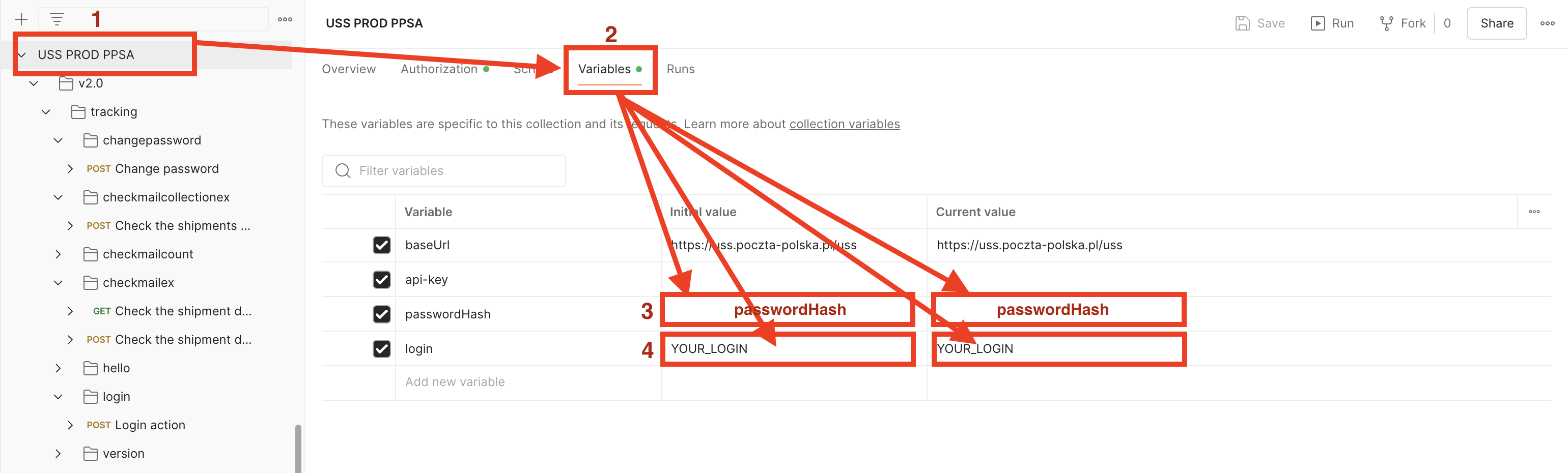
  • enter your login and password (encrypted) in the main collection tab in the Variables and save changes using the CTRL+S or CMD+S

This prepared environment allows you to retrieve shipment data. Remember, you must first use the login . Postman scripts will automatically save the token for use in other methods.

Here is the configuration file: Download file

6. Shared Events

Below is a list of event codes returned and presented in the tracking system along with their Polish and English translations.

When integrating, you should map event codes (e.g. P_NAD, P_D) and not event code names, because the names may change.

Download file (PDF): Download file


Information

Please be advised that Poczta Polska is implementing additional security measures in compliance with the DORA and NIS2 directives. One of these measures is disabling network traffic access for SSL/TLS protocols versions 1.0 and 1.1 for systems located at the following addresses: uss.poczta-polska.pl, tt.poczta-polska.pl, ws.poczta-polska.pl, and eag.poczta-polska.pl for REST API and WSDL/SOAP environments.

Those of you who still use the above-mentioned protocol are asked to modify their systems to at least TLS 1.2 version by April 10, 2025.

After this date, communication using the TLS 1.0 and TLS 1.1 protocols will no longer be possible, which may result in a failure to communicate with our tracking systems.


Request to create a REST API USS account

If you are interested in obtaining a dedicated user account with extended permissions, please complete and submit the form below.