User manual

tracking system using the WSDL/SOAP web service method

1. Introduction

Poczta Polska SA provides a WSDL web service that allows tracking of postal items.

The service is available at:

The tracking system service allows you to create one-time inquiries for both a single shipment number and multiple shipments.
For a one-time query of the system, you can use the default account whose parameters are as follows:
  • login: sledeniepp
  • password: PPSA
We encourage customers who plan to submit one-time inquiries about larger shipments or obtain extended shipment information to create a dedicated account. To do so, please contact Poczta Polska SA using the dedicated form.

PLEASE NOTE! Data provided by Poczta Polska SA's web service may not be modified substantively. Any changes to the information, including changes to the content of messages, such as shipment types and numbers, time of occurrence, or changes to their order, are prohibited. Only modifications to the data visualization method are permitted: adjusting font type and size, positioning of elements, etc. Data obtained using this tool may not be used for purposes other than reliably informing customers about events concerning their shipments delivered by Poczta Polska SA.

2. WSDL web service methods

I Information Methods
Hello
A method for testing the correctness of parameter passing. It requires a name parameter (string) and returns a text Hello .
version
returns the web service version number (string)
maximumNumberofShipments
returns the maximum number of shipments (int) that can be queried using the methods sprawdzPrzesylki , sprawdzPrzesylkiPl
II Checking one or more shipments
check the shipment
requires the shipment number, returns information about a given shipment in the Shipment - detailed information about branches in the Unit is not generated .
check Shipments
requires the shipment number or several shipment numbers, returns information about the given shipments in the Message – detailed information about the facilities in the Unit is not generated .
checkPrzesylkePl
requires the shipment number, returns information about a given shipment in the Shipment – detailed information about the facilities in the Unit is generated .
checkPrzesylki.pl
requires a shipment number or several shipment numbers, returns information about the given shipments in the Message – detailed information about the facilities in the Unit is generated .
III Checking shipments with events in the given period …FromTo
checkShipmentsFromTo
Requires one or more shipment numbers and a time period in the form of a start and end date (yyyy-mm-dd). Returns a Message , and detailed information about the facilities in the Unit is not generated . This method the Shipment Shipment structure is returned (only the status and number fields are filled in) with a status of 2.
check ShipmentsFromToPl
Requires one or more shipment numbers and a time period in the form of a start and end date (yyyy-mm-dd). Returns a Message , and detailed information about the facilities is generated the Unit . This method the Shipment in the shipment list with data only for shipments with events in the specified period. If the shipment had no events in the specified period, an empty Shipment (only the status and number fields are filled in) with a status of 2.
IV Authorization
The web service uses a simple authentication mechanism based on the Username Token Element . This standard is defined in Web Services Security (WSS): http://docs.oasis-open.org/wss/2004/01/oasis-200401-wss-soap-message-security-1.0.pdf the hello method containing the full Security Element is shown below.
For a SOAP/WSDL web service to function properly, it's essential to send a valid request. Below is an example using general authorization data:
trackingpp PPSA YYYY-MM-DDT00:00:00.000Z Jan
Diagnostic methods (except hello ) should have no body content. Other methods should have the following body structure:
for methods querying for a single shipment:
method > 123456 method >
for methods querying for more shipments:
method > 123456 123456789 method >

NOTE! Please remember that the following header must be added to each request:

"SOAPAction": "urn: ", "Content-Type": "text/xml; charset=utf-8"
Without the appropriate header, errors will be returned. A list of errors is provided below the instructions.

3. Information provided by the web service

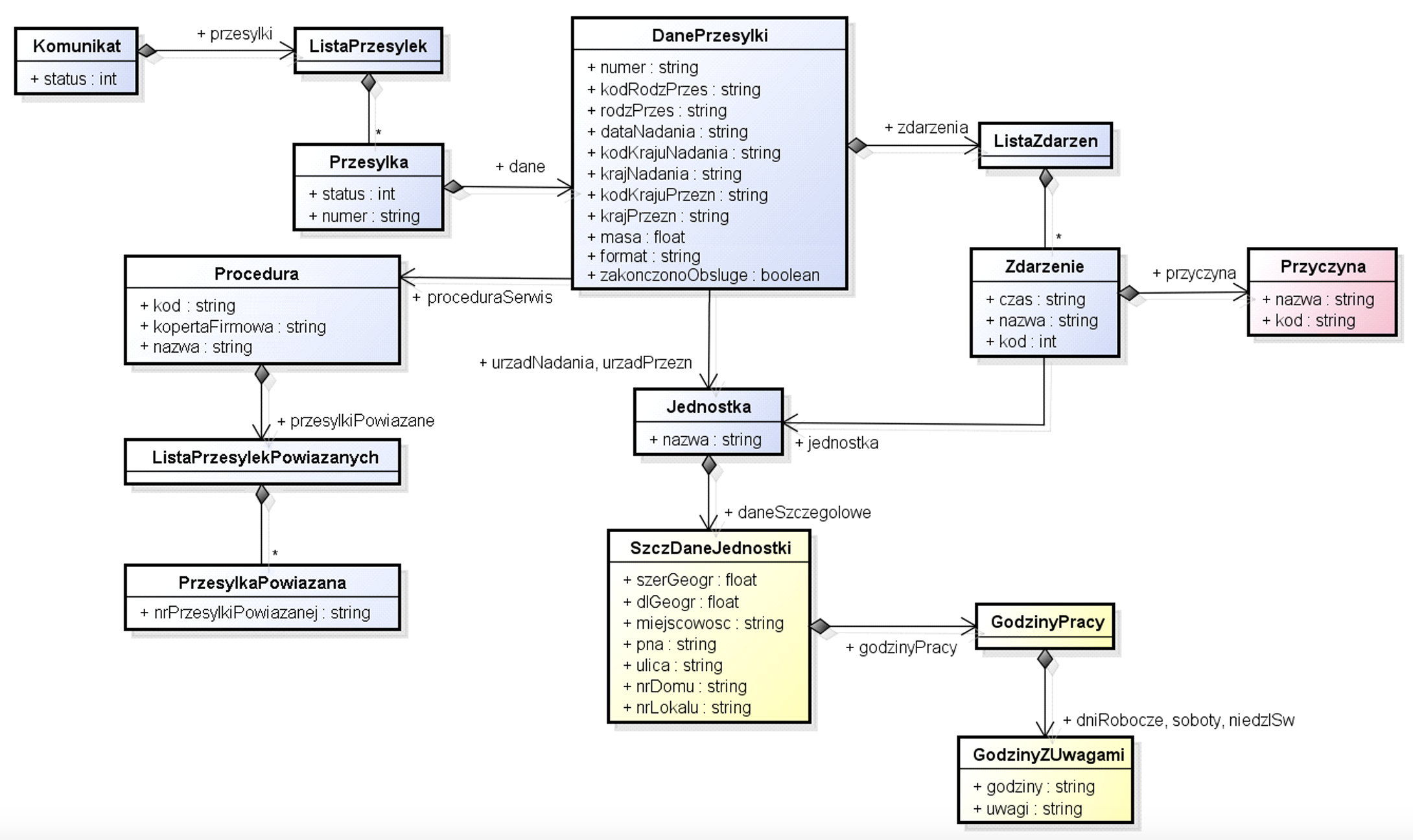
Data structure:
WSDL data structure
The web service provides the following information:
  • type of shipment (including shipment type code), e.g. priority parcel (PRP),
  • date of shipment,
  • shipment format (S, M, L)
  • name of the facility where the shipment was sent, e.g. UP Augustów 1,
  • name of the facility to which the shipment will be sent,
  • country of origin (including origin country code), e.g. Poland (PL),
  • country of destination (including destination country code),
  • shipment weight (in kg),
  • information about the end of the shipment's handling by Poczta Polska SA,
  • related shipment information (Procedural Shipment)
    • procedure code
    • name of the procedure
    • type of packaging (whether a company envelope [Y – yes, N – no])
    • list of related shipment numbers
  • a list of shipment-related events (statuses). For each event, the following is available:
    • date and time of the event,
    • event name (with event code), e.g. delivery (P_D),
    • cause of the event (with reason code), e.g. recipient not available (P_A_AANZ),
    • name of the facility where the incident occurred.
    • information whether the event is the last event ending the handling of the shipment by Poczta Polska SA Extended methods (*Pl) return additional information about the sending and destination facility and the facilities where the events took place:
  • geographical coordinates of the facility,
  • address details of the facility:
    • name of the town,
    • PNA,
    • street name,
    • house number,
    • apartment number,
  • office opening hours:
    • on weekdays e.g. 08:00-20:00 or Mon.: 08:00-20:00, Tue.: 08:00-20:00, Wed.: 09:00-16:00, Thu.: 08:00-20:00, Fri.: 08:00-20:00,
    • on Saturdays,
    • on Sundays and holidays,
    • notes regarding working hours.
Data model:
Announcement
status (int):
0
The searched shipment details were found
-1
inquiry about too many shipments
-2
no permission to check multiple shipments
-3
The dates provided in the sprawdzPrzesylkiOdDo or sprawdzPrzesylkiOdDoPl method calls are incorrect – the date check includes the date format (yyyy-mm-dd), the correct month number, and the correct day of the month. However, there is no check to see if the end date is greater than or equal to the start date. In such a case, the checked shipments, if any, will have a status (in the Przesylka!) structure of 2 – see below.
-99
Another mistake
Shipments (List of Shipments): filled for status equal to 0
Shipment List
shipment (Shipment[])
Delivery
status(int):
0
the searched shipment details were found
1
there are other shipments with this number
2
the shipment with the given number is in the system, but there are no events in the given period (applies to FromTo methods)
-1
There is no shipment with this number in the system. Please note: The web service only includes shipments with at least one event in the last 30 days.
-2
the given tracking number is incorrect
-99
Another mistake
number (string[20]): shipment number (as specified in the method parameter)
data (ShipmentData)
Shipment Data
number (string[20]) – again the shipment number
format (string[3]) – shipment format
kodRodzPrzes (string[5]) – shipment type code
type of shipment (string[64])
dataNadania (string[10]) – shipment date in the form yyyy-mm-dd
kodKrajuNadania (string[5]) – country code of the shipment origin (e.g. PL)
krajNadania (string[64]) – name of the sending country (e.g. POLAND)
kodKrajuPrzezn (string[5]) – code of the shipment's destination country (e.g. PL)
krajPrzezn (string[64]) – name of the destination country (e.g. POLAND)
urzadNadania (Unit) – information about the sending office
Office of Destination (Unit) – information about the destination facility
mass (float) – weight of the shipment in kg
terminatedObserve (boolean) – whether a so-called terminating event took place (e.g. delivery, collection of the shipment at the office, return of the shipment, etc.)
procedureService (Procedure)
events (EventList)
Procedure
code (string[3]) – service procedure code
corporate envelope (string[1]) – type of packaging (or corporate envelope) [Y – yes,N – no]
name (string[64]) – name of the service procedure
RelatedShipments (RelatedShipmentsList[])
List of Related Shipments
RelatedShipment (RelatedShipment[])
ShipmentRelated
nrPrzesylkiPowiazanej (string[20]) – shipment number
List of Events
event (Event[])
Event
time (string[16]) – event time in the form yyyy-mm-dd hh-nn
unit (Unit) – the unit (PP facility) in which the event took place
code (string[10]) – event code
terminace (boolean) – whether this event terminates the shipment handling
name (string[64]) – name of the event (e.g. Send with payload)
cause (Cause) – the cause of the event – ​​the attribute is filled in only for certain web service users
Unit
name (string[64])
Detailed data (SzczDaneJednostki) – empty for the CheckShipment and CheckShipment methods, filled for CheckShipmentPl and CheckShipmentPl
Cause
name (string[64]) – cause of the event
code (string[10]) – event cause code
SzczDataUnits
latitude of the facility (float from N(8,6))
dlGeogr (float z N(9,6)) – geographical longitude of the facility
town (string[64]) – town where the facility is located
pna (string[6]) – PNA (postal code) of the facility
street (string[169]) – street
HouseNo (string[11]) – house number
nrLokalu (string[7]) – apartment number
Working Hours (WorkingHours) – office hours
Working Hours
Working days (HoursWithNotes) – information about the facility's opening hours on working days
Saturdays (GodzinyZUnotami) – information about the facility's opening hours on Saturdays
niedziSw (GodzinyZUwagami) – information about the facility's opening hours on Sundays and public holidays
HoursWithNotes
hours (string[4000]) – working hours e.g. 08:00-24:00
notes (string[4000]) – notes on working hours

NOTE! The characters [] after the type name indicate a list (e.g. Shipment[] ⬌ list of Shipment type elements), the notation [ ] in the string type means the maximum length of the text (e.g. string[64] ⬌ text with a maximum length of 64 characters)


4. Error codes

Descriptions of error codes returned by the WSDL service, the so-called faultcode
400 Bad Request Invalid tracking number
400 responses are assigned to actions/verifications related to incorrect data provided by users.
401 Unauthorized Login:<login>
401 responses are related to a lack of user authorization, which is caused by an incorrectly entered username or password. If your login details are correct but you continue to receive this message, please contact PP SA support at sledzenie@poczta-polska.pl, including the returned message and your request.
403 Forbidden Login:<login> Account blocked
403 responses are related to user blocks or lack of permissions for selected methods. If the error is not related to excessive requests to the tracking system services, contact Poczta Polska to determine the cause of the block.
405 Method Not Allowed:<login>
This message indicates that your login password has changed or requires a password change. To do this, contact PP SA support at sledzenie@poczta-polska.pl, providing your login and the returned message.
404 Resources for the endpoint URI not found.
This message appears in "manual" integrations and means that the called web service method has been removed or its location in the structure has changed, you should verify the WSDL instructions and correct your code.
503 Break
The system is unavailable or experiencing a technical outage. The response body contains a return message with detailed information.

5. FAQ

List of possible errors that may occur during integration or during the current use of the integration
API Gateway encountered an error. Error Message: The endpoint reference (EPR) for the Operation not found is xx.xx.xxx.xx/ws/ppApiTrackingWsTt/1.0 and the WSA Action = null. If this EPR was previously reachable, please contact the server administrator.. Request Details: Service - ppApiTrackingWsTt, Operation - null, Invocation Time:11:09:39 AM, Date:Jul 8, 2024, Client IP - XX.XXX.XX.XXX, User - Default and Application:null
Announcement ...WSA Action = null... means that no header was added to WSDL/SOAP when executing the query
"SOAPAction": "urn:<metoda> "
.

Object Not Found ( non-existing-endpointws/ppApiTrackingWsTt.SleczenieHttpSoap11Endpoint/1.0 )
This message indicates that the wrong endpoint is being used – you should verify the WSDL statements and correct your code.

API Gateway encountered an error. Error Message: API Gateway outbound client encountered Internal Server Error. Request Details: Service - ppApiTrackingWsTt, Operation - checkPrzesylkiPl, Invocation Time:hh:ii:ss PM, Date:M dd, YYYY, Client IP - xxx.xxx.xx.xxx, User - Default and Application:null
You should verify that your request contains all the necessary parameters and schema. Often, the full Security Element the PasswordText type is not specified in the password . Compare your request with the example request .

API Gateway encountered an error. Error Message: API Gateway outbound client encountered WSDoAllReceiver: security processing failed. Request Details: Service - ppApiTrackingWsTt, Operation - checkPrzesylkiPl, Invocation Time:hh:ii:ss PM, Date:M dd, yyyy, Client IP - xx.xx.xxx.xx, User - Default and Application:null
The message ...security processing failed... means that the schema in the UsernameToken was not specified correctly (or is missing altogether). Please compare your request with the example request .

Fatal error: Uncaught SoapFault exception: [VersionMismatch] Wrong Version
Most likely, your code uses SOAP 1.2. The version of SOAP implemented in the tracking system is SOAP 1.1. The two differ, for example, in the definition namespace:
SOAP 1.1 namespace: http://schemas.xmlsoap.org/soap/envelope SOAP 1.2 namespace: http://www.w3.org/2003/05/soap-envelope

Failed to connect to tt.poczta-polska.pl port 80 after xx ms: Connection refused
This message means that our firewall has detected suspicious traffic from your IP address and has blocked it. To do this, contact PP SA support at sledzenie@poczta-polska.pl, providing your login and the returned message.

API Gateway encountered an error. Error Message: API Gateway outbound client encountered decoding error; illegal input parameter value(s). Request Details: Service - ppApiTrackingWsTt, Operation - maximNirczbaPrzesylek, Invocation Time:hh:ii:ss PM, Date:M dd, yyyy, Client IP - xx.xxx.xx.xxx, User - Default and Application:null
The message ...illegal input parameter value(s) informs that information methods (except hello ) cannot contain anything in their body. If the maximumNumber of Shipments value in the body , this is the error message we will receive. The body section should be cleared.

Error while applying xPath. Error:Exception occurred evaluating XPath: /soapenv:Envelope/soapenv:Body/ns:sprawdzPrzesylkiResponse/ns:return/ax21:przesylki/ax21:przesylka/ax21:danePrzesylki/ax21:events/ax21:event. Exception: XPath expression uses unbound namespace prefix ns
An error occurs on the client application side. Depending on the language in which the application's code is written, some mechanisms require a prefix in the form nsSome libraries require that namespaces be declared. However, you can use XPath without namespaces. In that case, you can use the following example expression:
/*[local-name()='Envelope']/*[local-name()='Body']/*[local-name()='sprawdzPrzesylkiResponse']/*[local-name()='return']/*[local-name()='przesylki']/*[local-name()='przesylka']/*[local-name()='danePrzesylki']/*[local-name()='events']/*[local-name()='event']

6. POSTMAN files

For your convenience, we have prepared a ready-made configuration file that, once imported into the POSTMAN application, will allow you to quickly test methods for querying shipment statuses.

This application has variables {username}, {password}, ​​which if you have dedicated login details, enter them appropriately in the Variables .

Here is the configuration file: Download file

7. Shared Events

Below is a list of event codes returned and presented in the tracking system along with their Polish and English translations.

When integrating, you should map event codes (e.g. P_NAD, P_D) and not event code names, because the names may change.

Download file (PDF): Download file


Information

Please be advised that Poczta Polska is implementing additional security measures in compliance with the DORA and NIS2 directives. One of these measures is disabling network traffic access for SSL/TLS protocols versions 1.0 and 1.1 for systems located at the following addresses: uss.poczta-polska.pl, tt.poczta-polska.pl, ws.poczta-polska.pl, and eag.poczta-polska.pl for REST API and WSDL/SOAP environments.

Those of you who still use the above-mentioned protocol are asked to modify their systems to at least TLS 1.2 version by April 10, 2025.

After this date, communication using the TLS 1.0 and TLS 1.1 protocols will no longer be possible, which may result in a failure to communicate with our tracking systems.


WSDL/SOAP Account Creation Request